How Much Does a Fiber Laser Marking Machine Cost in 2026?
If you’re shopping for a fiber laser marking machine, one of the first questions you probably have is: how much does it cost? The answer isn’t simple — prices can range from a few thousand dollars for a basic desktop model to over $50,000 for a high-end industrial system. Understanding what drives the price and what you actually need will help you make a smart buying decision.
In this guide, we’ll break down fiber laser marking machine prices across different categories, explain the key factors that affect cost, and help you figure out which machine fits your budget and application. We’ll also cover hidden costs that many buyers overlook, so you can budget accurately.
Quick Price Overview by Machine Type
Here’s a quick reference for fiber laser marking machine prices in 2026. These are approximate ranges — actual pricing depends on brand, configuration, power, and features.
| Machine Type | Power | Typical Price Range (USD) | Best For |
|---|---|---|---|
| Portable / handheld | 20W – 30W | $1,800 – $5,000 | Small businesses, hobbyists, on-site marking |
| Desktop / benchtop | 20W – 50W | $2,500 – $8,000 | Workshops, labs, low-volume production |
| Standard enclosed | 20W – 100W | $4,000 – $15,000 | Medium-volume production, job shops |
| Industrial production | 30W – 100W+ | $10,000 – $35,000 | High-volume manufacturing, automation |
| Custom / automated line | 20W – 200W | $25,000 – $100,000+ | Factory integration, conveyor systems, robotic cells |
As you can see, there’s a huge range. Let’s dive into each category and the factors that determine where a specific machine falls on the price spectrum.
Key Factors That Affect Price
1. Laser Power
Laser power is the single biggest factor in the price of a fiber laser marking machine. More power = higher price, but also faster marking and the ability to mark deeper or on harder materials.
- 20W: The most common entry-level power. Suitable for most basic marking applications on plastics, metals, and coated materials. Good for serial numbers, barcodes, logos, and date codes. Price range: $2,000 – $5,000 for a decent machine.
- 30W: The sweet spot for many businesses. 50% more power than 20W means faster marking speeds and better results on difficult materials. Price range: $3,500 – $8,000.
- 50W: High-power desktop or entry-level industrial. For deep engraving, fast production, or marking on highly reflective materials. Price range: $6,000 – $12,000.
- 100W+: Industrial production and deep engraving applications. These machines can engrave deeply into metal and mark at very high speeds. Price range: $12,000 – $30,000+.
Recommendation: Don’t buy more power than you need, but don’t under-buy either. A 20W machine might save you money upfront, but if you need to mark stainless steel or run production volumes, you’ll be much happier with 30W or 50W. Most users find that 30W offers the best balance of price and capability.
2. Laser Source Quality
The laser source is the heart of the machine, and its quality has a huge impact on both price and performance. There are significant differences between budget and premium laser sources:
- Chinese budget brands (e.g., JPT budget line, MAX, Raycus budget): Lower cost, generally reliable for basic use. Expected lifespan: 50,000–80,000 hours.
- Chinese premium brands (e.g., JPT MOPA, Raycus high-end, MAXphotonics): Better beam quality, more stable output, longer life. Expected lifespan: 80,000–120,000 hours.
- International premium brands (e.g., IPG Photonics, Coherent, SPI Lasers): Top-tier quality, excellent beam quality, global support. Expected lifespan: 100,000+ hours. Significantly more expensive.
A machine with an IPG laser source can cost 2–3x more than the same machine with a Chinese budget laser. For many applications, a quality Chinese laser source like JPT or Raycus provides excellent value and reliability. Transon Laser uses JPT and Raycus laser sources in our marking machines, offering a great balance of performance, reliability, and price.
3. Machine Configuration and Features
Beyond the laser source itself, many features affect the price:
| Feature | Price Impact | Notes |
|---|---|---|
| Enclosed cabinet | +$1,000 – $3,000 | Safety enclosure with viewing window, required for Class 1 safety |
| Motorized Z-axis | +$500 – $1,500 | Electric height adjustment vs. manual focus |
| Rotary attachment | +$300 – $1,000 | For marking round parts (bottles, cylinders, rings) |
| XY worktable | +$1,000 – $3,000 | Motorized XY stage for marking large areas or multiple parts |
| Camera positioning | +$1,500 – $4,000 | Vision system for precise part alignment |
| Conveyor system | +$3,000 – $10,000 | For inline production marking |
| MOPA capability | +$1,000 – $3,000 | Ability to mark colors on stainless steel (black, white, rainbow) |
| Auto-focus | +$800 – $2,000 | Automatic focus adjustment for parts of varying height |
| Dust extraction | +$300 – $1,500 | Fume and dust extraction system |
4. Brand and Country of Origin
Brand reputation and where the machine is made significantly affect the price:
- Chinese manufacturers (e.g., Transon Laser, Han’s Laser, Bodor, Golden Laser): Generally the best value. Quality has improved dramatically over the past decade, and many Chinese brands now build machines that compete with international brands at a fraction of the cost. Price range: $2,000 – $20,000 for most models.
- European manufacturers (e.g., Trumpf, Keyence, Videojet, Domino): Premium pricing, but excellent build quality, global service networks, and advanced software. Price range: $10,000 – $50,000+.
- US / Japanese manufacturers (e.g., Coherent, Panasonic, Mitsubishi): Similar to European in pricing and quality. Often sold through specialized distributors.
The price gap between Chinese and Western brands has narrowed in terms of quality but remains very significant in terms of cost. For most businesses, a quality Chinese machine from a reputable manufacturer like Transon Laser offers the best return on investment.
5. Software and Control System
The software that comes with the machine matters more than many buyers realize. Good software makes marking fast and intuitive; bad software causes frustration and lost productivity.
- Basic software (free / included): Supports text, barcodes, basic graphics. May have limited features and clunky interface.
- Professional software (included with better machines): More features, better import capabilities, variable data marking, serialization.
- Premium software (extra cost or included with high-end machines): Advanced features like vision alignment, database integration, automation APIs, remote management.
All Transon fiber laser marking machines come with professional EZCAD software, which is the industry standard for Chinese laser marking machines and supports a wide range of marking tasks including text, graphics, barcodes, QR codes, and serial numbers.
Price Breakdown by Category
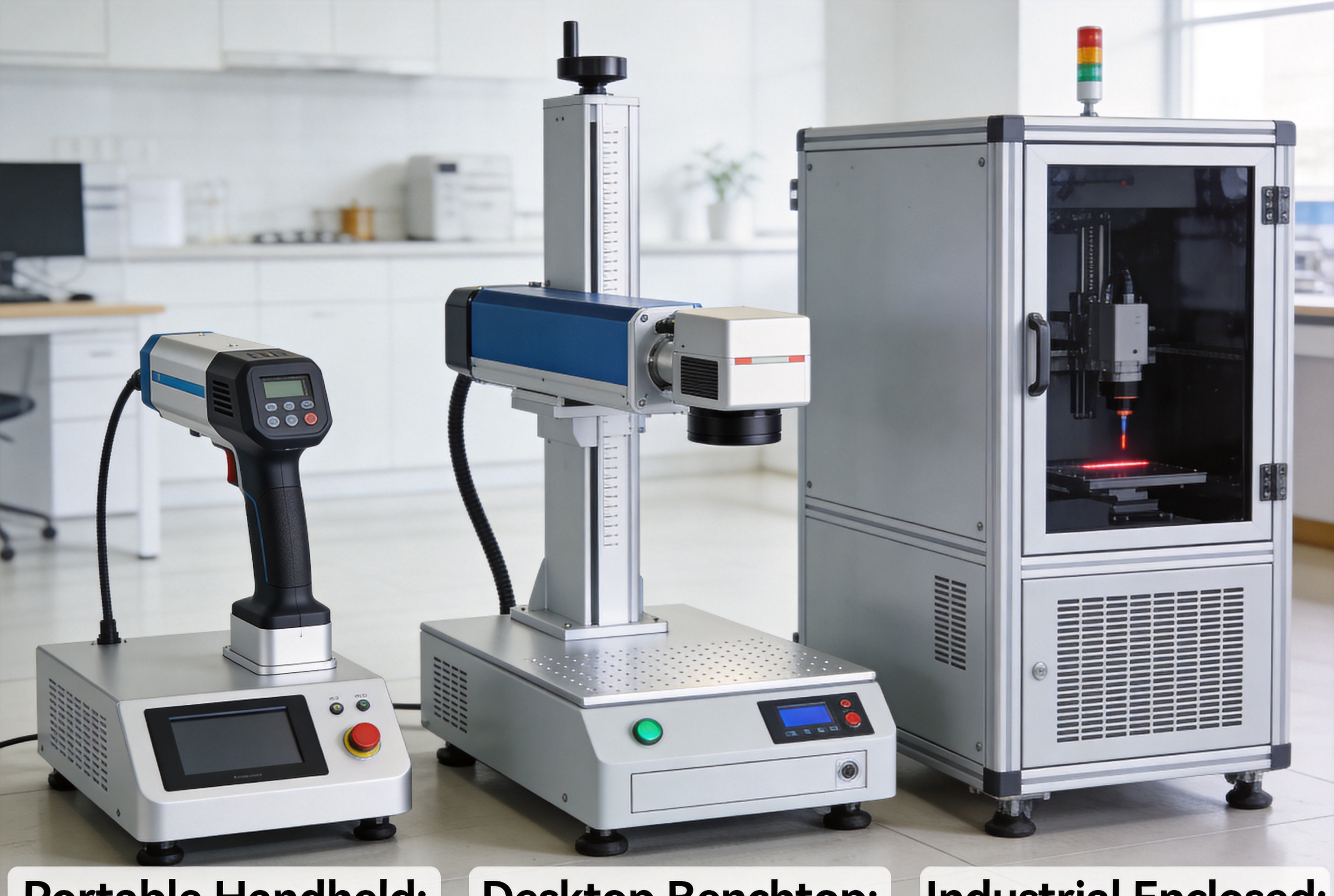
Portable / Handheld Fiber Laser Marking Machines
Price range: $1,800 – $5,000
These compact, lightweight machines are designed for on-site marking or for businesses with limited space. They typically come with a 20W or 30W laser source and a handheld marking gun.
Pros:
- Low cost of entry
- Portable — can take the machine to the workpiece
- Good for large or heavy parts that can’t be moved to a machine
- Easy to set up and use
Cons:
- Less precise than a fixed machine
- Limited features
- Usually no safety enclosure (requires proper PPE)
- Not suitable for high-volume production
Best for: Small businesses, repair shops, custom engraving services, on-site marking applications, and anyone getting started with laser marking on a tight budget.
Desktop / Benchtop Fiber Laser Marking Machines
Price range: $2,500 – $8,000
These are the most popular type of fiber laser marking machine for small to medium businesses. They sit on a workbench and offer a good balance of price, performance, and features.
Pros:
- Good value for money
- More precise and consistent than handheld
- Available with enclosures for safety
- Wide range of power options (20W–50W)
- Can add rotary attachments and other accessories
Cons:
- Not portable
- Limited marking area (typically 100x100mm to 300x300mm)
- May not be suitable for very high volume
Best for: Workshops, job shops, manufacturers with medium volume, research labs, and businesses that need reliable marking without breaking the bank. The Transon TS-M20 desktop fiber laser marking machine is a popular choice in this category.
Standard Enclosed Industrial Machines
Price range: $4,000 – $15,000
These fully enclosed machines are designed for production environments. They come with Class 1 safety enclosures, larger marking areas, and more features than desktop models.
Pros:
- Full safety enclosure (Class 1 laser product)
- Larger marking area options
- More robust construction for industrial use
- Available with higher power (up to 100W+)
- Often include motorized Z-axis and other features
Cons:
- Higher price
- Larger footprint
- Overkill for very low-volume use
Best for: Medium to high-volume production, manufacturing facilities, and businesses that need a reliable, safe, and productive marking solution.
Automated / Production Line Systems
Price range: $10,000 – $100,000+
These are custom systems designed to integrate into production lines. They may include conveyors, robotic arms, vision systems, multiple laser heads, and custom software integration.
Pros:
- High throughput
- Automated operation reduces labor costs
- Consistent quality
- Can be customized for specific applications
Cons:
- High initial investment
- Longer lead times
- More complex setup and maintenance
- Requires technical expertise to operate
Best for: High-volume manufacturing, automotive, aerospace, medical device, and electronics industries where marking needs to be integrated into existing production lines.
Hidden Costs to Consider
The purchase price is only part of the total cost. Here are some additional expenses to factor into your budget:
1. Shipping and Installation
- Shipping: $200 – $2,000+ depending on size, weight, and distance. Sea freight from China is cheaper but takes 4–6 weeks; air freight is faster but more expensive.
- Installation: Many machines are plug-and-play and don’t require professional installation. For automated systems, installation and training can add $1,000 – $5,000.
- Training: Basic operation is usually covered in the manual and video tutorials. On-site training costs extra ($1,000 – $3,000+ per day including travel).
2. Consumables and Maintenance
- Lens cleaning kits: $20 – $100 per kit (needed regularly)
- Field lens replacement: $200 – $1,000 if damaged (should last years with proper care)
- Galvo mirrors: Rarely need replacement under normal use, but $500 – $2,000 if damaged
- Annual maintenance: Minimal for fiber lasers — mostly just cleaning and inspection. Budget $200 – $500 per year.
One of the biggest advantages of fiber laser marking machines is their very low operating cost. Unlike CO2 lasers or other technologies, there’s no laser gas to replace, no mirrors to align, and very few consumables. The electricity cost is also minimal — typically just a few dollars per day even for continuous use.
3. Software Upgrades and Licenses
- Basic software is usually included
- Advanced features may require paid upgrades: $200 – $2,000
- Some premium brands charge annual software maintenance fees
4. Warranty and Support
- Standard warranty: 1–3 years is common for the laser source, 1 year for the whole machine
- Extended warranty: Usually 5–15% of the purchase price per year
- Service contracts: For businesses that can’t afford downtime, a service contract provides priority support and regular maintenance
Transon Laser includes a 3-year warranty on the laser source and 2 years on the whole machine with every marking system, plus lifetime technical support. We believe in the quality of our machines and stand behind them.
5. Safety Equipment
- Laser safety glasses: $50 – $200 per pair (essential for Class 4 machines)
- Fume extractor: $300 – $2,000 (recommended for marking plastics, coated metals, or any material that produces fumes)
- Safety signage and barriers: $50 – $500
Is It Worth the Investment?
For most businesses, a fiber laser marking machine pays for itself surprisingly quickly. Here’s a simple ROI calculation example:
Suppose you buy a 30W desktop fiber laser marking machine for $5,000. You use it to mark parts for your production line, replacing an older method (like pad printing or chemical etching) that costs $0.20 per part in labor and consumables. The laser costs about $0.01 per part in electricity and consumables.
- Savings per part: $0.19
- If you mark 100 parts per day × 250 working days = 25,000 parts per year
- Annual savings: 25,000 × $0.19 = $4,750
- Payback period: about 13 months
And that’s just the direct cost savings. You also get:
- Better quality marks — permanent, precise, consistent
- More versatility — can mark text, logos, barcodes, QR codes, serial numbers, etc.
- Less downtime — no setup changes between jobs (just load a new file)
- Traceability — permanent marking for quality control and anti-counterfeiting
- Professional appearance — laser marks look clean and high-end
For many businesses, the payback period is even shorter when you factor in reduced rework, faster changeovers, and the ability to take on new types of jobs that weren’t possible before.
Tips for Getting the Best Value
1. Buy the Right Power for Your Application
Don’t buy more power than you need, but don’t under-buy either. Most applications work fine with 20W or 30W. If you’re marking stainless steel, need deep engraving, or have high-volume production, go for 50W or more. When in doubt, ask the supplier to mark samples for you — that’s the best way to know if a machine will meet your needs.
2. Consider Total Cost of Ownership, Not Just Purchase Price
A cheaper machine might seem like a bargain, but if it breaks down frequently or has poor support, it could end up costing you more in the long run. Look at the warranty, expected lifespan, availability of spare parts, and quality of support.
3. Ask for Samples and a Demo
Any reputable supplier should be willing to mark your parts for free so you can see the quality firsthand. If possible, visit a showroom or arrange a video demo to see the machine in action.
4. Check What’s Included
Make sure you know exactly what comes with the machine. Does it include software? A rotary attachment? Spare lenses? Training? Shipping? A machine that seems more expensive might actually be a better deal if it includes accessories you’d have to buy separately anyway.
5. Consider After-Sales Support
What happens if the machine has a problem? How quickly can you get replacement parts? Is there technical support in your language and time zone? Good support can save you days of downtime, which is worth real money.
Transon Laser provides worldwide technical support via phone, email, and video call. We keep spare parts in stock and can ship them quickly to most countries. Our machines are designed to be easy to maintain, and we provide detailed manuals and video tutorials to help you get the most out of your investment.
Frequently Asked Questions
How long does a fiber laser marking machine last?
Quality fiber laser sources typically last 80,000–120,000 hours or more. If you run the machine 8 hours a day, 5 days a week, that’s about 20–30 years of use before the laser source needs replacement. In practice, most machines are replaced for other reasons (technology changes, business growth) long before the laser wears out.
Can I mark different materials with the same machine?
Yes! Fiber laser marking machines work on a wide range of materials including most metals (steel, stainless steel, aluminum, copper, brass), many plastics, coated materials, ceramics, and more. You may need to adjust parameters (power, speed, frequency) for different materials, but the same machine handles all of them.
Do I need special training to operate it?
Basic operation is quite simple — most people can learn to use a fiber laser marking machine in a few hours. Creating complex designs or optimizing parameters for difficult materials takes more experience, but the learning curve is manageable. Reputable suppliers provide training materials and support to help you get started.
Are fiber laser marking machines safe?
Yes, when used properly. Enclosed machines are Class 1 laser products, meaning they’re safe for normal operation without additional protective equipment. Open-frame machines are Class 4 and require laser safety glasses and proper safety procedures. Always follow the manufacturer’s safety instructions and applicable regulations.
Can I import a machine from China?
Absolutely. Many businesses successfully import fiber laser marking machines from Chinese manufacturers. The key is to work with a reputable supplier like Transon Laser that has experience with international customers and can provide proper documentation, shipping, and after-sales support. Be sure to factor in import duties, taxes, and shipping costs when comparing prices.
Conclusion
A fiber laser marking machine is a significant investment, but for most businesses, it’s one that pays for itself quickly through improved efficiency, better quality, and expanded capabilities. Prices range from under $2,000 for a basic portable model to $50,000+ for high-end automated systems, but most businesses will find what they need in the $3,000 – $10,000 range.
When comparing prices, remember to look at the total value — not just the sticker price. Consider the laser source quality, machine construction, included features, software, warranty, and after-sales support. A slightly more expensive machine from a reputable supplier can save you money and headaches in the long run.
If you’re ready to explore your options, contact Transon Laser today for a free consultation and quote. Our team will help you find the right fiber laser marking machine for your specific application and budget. We offer 20W, 30W, 50W, and 100W models in both desktop and industrial configurations, with worldwide shipping and support.
For more information about laser marking and other laser technologies, check out these related articles: